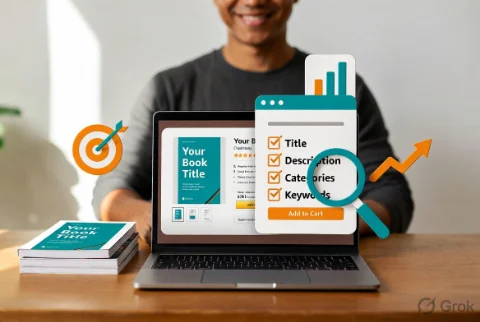
You spent months writing your book. You got the cover just right. You published it with excitement. Then the sales stayed quiet.
A lot of indie authors face this exact situation. The book is good. The problem is often the book page itself.
Your Amazon product page is not just a listing. It is your storefront, your first impression, and one of the biggest ranking signals Amazon uses. When readers land on your page and like what they see, they buy. When they buy, Amazon shows your book to more people. It is a beautiful cycle once you get it working.
In this guide we will break down exactly how to optimize your Amazon book page in 2026 so it ranks higher and sells more copies.
Why Your Book Page Optimization Matters So Much
Amazon’s algorithm today cares deeply about two things: relevance and performance.
A well-optimized page improves both. Good titles and descriptions help with relevance. Strong conversion (people actually buying after they click) improves performance. Better performance tells Amazon to show your book to even more readers.
The beautiful part? Most of these optimizations are completely within your control.
1. Title and Subtitle: Your Most Powerful Ranking Tools
Your title and subtitle are the first things readers see in search results. They also carry heavy weight for Amazon’s search algorithm.
Best practices for 2026:
- Put your main keyword phrase near the front when it feels natural
- Make the title clear and benefit-focused
- Use the subtitle for extra keywords, series info, or a compelling hook
- Keep the whole thing readable. No one wants to click on something that looks spammy
Example for a cozy mystery: Title: Death by Chocolate Cake Subtitle: A Cozy Cat Mystery with Recipes (Book 1)
The subtitle adds searchable phrases without making the main title awkward.
2. Book Description: Turn Browsers into Buyers
Your description needs to do two jobs at once. It must help with search rankings and convince someone to click “Buy now.”
What works well right now:
- Start with a strong hook in the first paragraph
- Use short paragraphs and line breaks for easy reading on mobile
- Include natural keyword phrases (no stuffing)
- Add bullet points or bold text for skimmability
- End with a clear call to action
Many successful indie authors also use simple HTML formatting (bold, italics, line breaks) to make the description look more professional. Amazon allows this through the KDP dashboard.
Pro tip: Write the description like you are recommending the book to a friend. Warm and genuine converts better than hard selling.
3. Categories: Choose Them Strategically
Categories help Amazon understand where your book belongs and show it to the right readers.
You get to choose two main categories during setup, and you can request more later through KDP support.
Smart approach:
- Pick the most specific categories where your book can actually compete
- Look at where similar successful books are categorized
- Avoid super broad categories where you will get lost
- Update categories if your book performs better in a different one after launch
A well-chosen category can mean the difference between being buried on page 50 and appearing on page 2 or 3.
4. Keywords: Support Everything Else
We covered keyword research in detail in our previous guide (The Ultimate Guide to Amazon KDP Keyword Research for Indie Authors in 2026).
Quick reminder: Use your seven backend keyword slots for phrases that did not fit naturally into your title or description. Focus on buyer intent and long-tail terms. Do not repeat words already in your title.
5. Cover Design and Visual Elements
Your cover is often the deciding factor between a click and a scroll-past.
2026 best practices:
- Make sure it looks professional and matches your genre perfectly
- Test how it looks as a tiny thumbnail (most people see it small first)
- Use high contrast and clear text
- Consider adding a subtle series number or tagline if it helps
Also pay attention to the “Look Inside” feature. Make the first few pages clean and inviting. Many readers decide to buy after previewing the sample.
6. Pricing: Find the Sweet Spot
Pricing affects both conversion and perceived value.
Test different prices over time. Many indie authors find success with:
- Launch pricing to build momentum
- Permanent price that matches reader expectations in their genre
- Occasional promotions to boost visibility
Watch your category and similar books. Pricing too high or too low compared to the market can hurt conversions.
7. Additional Page Elements That Help
- Editorial Reviews — Reach out to book bloggers and reviewers in your genre
- A+ Content (if eligible) — Use it to add more images, author story, and extra selling points
- Author Page — Keep your author bio and photo updated and professional
- Series Page — If you have multiple books, make sure they are linked properly
Every extra element adds trust and gives readers more reasons to buy.
Common Book Page Mistakes to Avoid
- Title or subtitle that is hard to read or keyword-stuffed
- Long walls of text in the description
- Generic or low-quality cover
- Choosing categories that are too competitive for a new book
- Never updating the page after launch
- Ignoring mobile experience (most shoppers browse on phones)
Simple Optimization Checklist You Can Use Today
- Review your current title and subtitle. Can you make them clearer or stronger?
- Rewrite your description with a strong hook and easy-to-scan formatting.
- Check your two main categories. Are they the best fit?
- Audit your seven backend keywords.
- Look at your cover on a phone screen. Does it still work?
- Test a small price change if sales have been flat.
- Add or request better categories if needed.
Do one or two of these each week and you will see steady improvement.
The Bottom Line
Optimizing your Amazon book page is not about tricking the algorithm. It is about making it easy for the right readers to find your book and fall in love with it.
When your page is clear, professional, and compelling, two things happen. More people buy. And Amazon rewards you by showing your book to even more potential readers.
You already did the hard creative work of writing the book. Now give it the best possible chance to succeed by making the page that represents it as strong as the story inside.
Which part of your book page are you going to work on first? Title? Description? Drop a comment below and let us know. The Indie Reading Community is here to cheer you on and share what is working for other authors right now.
You have got this. One optimized page at a time.